The Order Manager owns two main screens;
- The order status screen. This is the HOME screen when you enter the Order Manager
- The order detail screen
The search bar on the left is always in place.
Tutorial mode
A tutorial mode is available by clicking the checkbox for tutorial in the header navigation bar.

1. Order status screen
When you are logged in you see a list of all your active buyer orders in the middle and their status.
On the left you find the order status search bar.
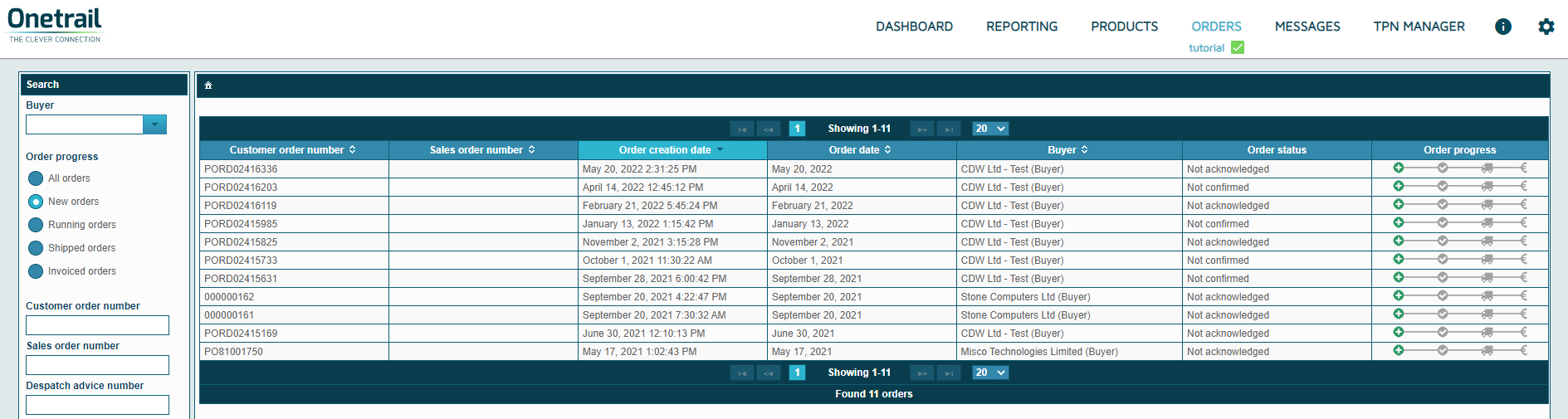
List of all active buyer orders
Below a description of how to read each column.
Column header | Additional information | Icon |
Customer order number | The buyer reference | |
Sales order number | Your sales order number | |
Order creation date | The order creation date and time | |
Order date | Date the order has been send to you | |
Buyer | Name of your Customer | |
Order status | Your Order can have the following status:
| |
Order progress | Your order can have one of the following four progress stages: | |
1 - Sent | ||
The order is in error |
| |
The order is new received by you |
| |
2 - Confirmed | ||
You have not send an order status yet |
| |
You have confirmed the order |
| |
You have deleted the order or you have put the order is on-hold |
| |
3 - Shipped | ||
You have fully shipped the order |
| |
You have partially shipped the order |
| |
4 - Invoiced | ||
You have fully invoiced the order |
| |
You have partially invoiced the order |
|


