Product grouping improvement — regional GTIN variants - release date: June 16th, 2026
Products that exist under multiple GTINs (for example a UPC for the USA and a GTIN for the rest of the world) are now grouped under a single product entry, provided they share the same manufacturer part number, brand, and condition.
As a result, you will see unified offers from all sellers for the same physical product, rather than duplicate entries (-OT variants).
Existing duplicate entries have been cleaned up as part of this release.
| HTML |
|---|
<!DOCTYPE html>
<html>
<head>
<meta http-equiv="Content-Type" content="text/html; charset=utf-8">
<meta name="viewport" content="width=device-width, initial-scale=1.0">
<title></title>
<style>
  body { margin: 0; padding: 15pt 0; background: white; font-family: Helvetica, Arial, sans-serif; }
  a { color: #02495A; }
  .email-wrapper { width: 900px; margin: 0 auto; background: white; }

  /* Header */
  .header { background: #EDF5FA; padding: 24px 15px; text-align: center; }
  .header-label { font-size: 11pt; color: #02495A; letter-spacing: 1px; margin-bottom: 4px; }
  .header-title { font-size: 16pt; font-weight: bold; color: #02495A; }

  /* Launch banner */
  .launch-banner { background: #CCE9F9; padding: 12px 15px; border-bottom: 1px solid #b0d8ef; }
  .launch-banner p { margin: 0; font-size: 11pt; font-weight: bold; color: #02495A; }

  /* Body sections */
  .section { background: white; padding: 20px 15px; }
  .section p { line-height: 1.6; color: #02495A; font-size: 11pt; margin: 0 0 12px; }
  .section p:last-child { margin-bottom: 0; }

  /* Divider */
  .divider { border: none; border-top: 1px solid #DDDDDD; margin: 0; }

  /* Section headings */
  .section-heading { font-size: 13.5pt; font-weight: bold; color: #02495A; margin: 0 0 8px; }

  /* Feature blocks */
  .feature-block { margin-bottom: 16px; }
  .feature-block strong { color: #02495A; }

  /* Tabs table */
  .tabs-table { width: 100%; border-collapse: collapse; margin: 8px 0 16px; }
  .tabs-table td { padding: 7px 12px; font-size: 11pt; line-height: 1.5; color: #333; background: #F0F5FB; }
  .tab-ongoing  { border-left: 3px solid #003366; }
  .tab-overdue  { border-left: 3px solid #CC3300; }
  .tab-archived { border-left: 3px solid #666666; }
  .tab-complete { border-left: 3px solid #2E7D32; }
  .tabs-spacer  { height: 4px; }

  /* Alternate section bg */
  .section-alt { background: #FAFAFA; padding: 20px 15px; }
  .section-alt p { line-height: 1.6; color: #02495A; font-size: 11pt; margin: 0 0 12px; }

  /* CTA button */
  .cta-wrap { padding: 8px 0 16px; }
  .cta-btn { display: inline-block; background: #63CC44; color: #02495A; text-decoration: none; font-family: Helvetica, Arial, sans-serif; font-size: 11pt; font-weight: normal; padding: 9px 18px; border-radius: 3px; }

  /* Footer */
  .footer { background: #FAFAFA; padding: 18px 15px; text-align: center; }
  .footer p { font-size: 9pt; color: #02495A; line-height: 1.5; margin: 0; }
</style>
</head>
<body>

<div class="email-wrapper">

  <!-- HEADER (no logo, per request) -->
  <div class="header">
    <div class="header-label"></div>
    <div class="header-title"><strong>Announcing the New Order Manager</strong></div>
  </div>

  <!-- LAUNCH BANNER -->
  <div class="launch-banner">
    <p>🚀 Going live: Wednesday, June 10th</p>
  </div>

  <!-- INTRO -->
  <div class="section">
    <p>We're excited to announce the upcoming release of the <strong>New Order Manager</strong>. The Order Manager covers the full order lifecycle, maintaining order status, creating shipments, and generating invoices.</p>
    <p><strong>This release focuses on order status management.</strong> Shipment and invoice creation will follow in subsequent releases. Dedicated announcements will be made for each.</p>
  </div>

  <hr class="divider">

  <!-- WHAT'S NEW -->
  <div class="section">
    <h3 class="section-heading">What's New?</h3>

    <div class="feature-block">
      <p><strong>Refreshed UI</strong><br>
      A completely redesigned interface built for better usability, clarity, and a more intuitive workflow.</p>
    </div>

    <div class="feature-block">
      <p><strong>New Order Tabs</strong><br>
      Orders are now organised across four dedicated tabs:</p>
      <table class="tabs-table" cellspacing="0" cellpadding="0" border="0">
        <tbody>
          <tr><td class="tab-ongoing"><strong>Ongoing:</strong> your active orders at a glance</td></tr>
          <tr class="tabs-spacer"><td style="height:4px"></td></tr>
          <tr><td class="tab-overdue"><strong>Overdue:</strong> orders with a scheduled delivery date that has passed</td></tr>
          <tr class="tabs-spacer"><td style="height:4px"></td></tr>
          <tr><td class="tab-archived"><strong>Archived:</strong> orders you've moved out of active view</td></tr>
          <tr class="tabs-spacer"><td style="height:4px"></td></tr>
          <tr><td class="tab-complete"><strong>Completed:</strong> orders that are done and dusted</td></tr>
        </tbody>
      </table>
    </div>

    <div class="feature-block">
      <p><strong>Cleaner Workspaces</strong><br>
      Move orders to Archived at any time, keeping your Ongoing and Overdue tabs focused on what actually needs attention.</p>
    </div>

    <div class="feature-block">
      <p><strong>Bulk Order Updates</strong><br>
      Select multiple orders and update them all at once — no more one-by-one editing.</p>
    </div>

    <div class="feature-block">
      <p><strong>And Much More</strong><br>
      Many additional improvements are waiting to be discovered as you work with the new interface.</p>
    </div>
  </div>

  <hr class="divider">

  <!-- SWITCHING -->
  <div class="section-alt">
    <h3 class="section-heading">Switching Between Old and New</h3>
    <p>The interaction between the new and classic Order Manager is fully built-in. Switching between them is seamless and frictionless — no disruption to your existing workflow.</p>
  </div>

  <hr class="divider">

  <!-- DOCUMENTATION & SUPPORT -->
  <div class="section">
    <h3 class="section-heading">Documentation & Support</h3>
    <p>Full user documentation is available online:</p>

    <div class="cta-wrap">
      <a href="https://docs.onetrail.com/display/docs/New+Order+Manager" class="cta-btn"><strong>View Documentation →</strong></a>
    </div>

    <p>A <strong>built-in chatbot</strong> will also be added to the New Order Manager, so you can ask questions and get help directly in natural language, right where you need it.</p>

    <p>If you have any questions or encounter any issues, please contact your usual support channel.<br></p>
  </div>

</div><!-- /email-wrapper -->

</body>
</html>
|
| Info | ||
|---|---|---|
| ||
Product Viewer & Message Viewer — Upgrade ReleasedToday, April 22nd 2026, we released an upgraded version of the Product Viewer and Message Viewer. |
Change in password security
We are committed to keeping your data secure while making your experience with the Onetrail Trading Partner Network as convenient as possible. In line with the latest security standards from the National Institute of Standards and Technology (NIST) Special Publication 800-63B, we are updating our password policy for all customer accounts and service user accounts (used for APIs and web services).
What’s Changing?
- Password Expiry:
Passwords will no longer expire on a fixed schedule. You will only need to change your password if there is evidence of compromise or if you choose to do so.
- Password Length:
The new minimum password length will be 15 characters.
- Password Complexity:
You will no longer be required to use special characters, uppercase, or lowercase letters. You are free to create a password or passphrase that is easy for you to remember, as long as it meets the minimum length.
- Service User Accounts:
These changes also apply to service user accounts used for APIs and web services by your applications.
- SFTP User Accounts:
SFTP user accounts are already exempt from password expiry and will remain unchanged.
What Does This Mean for You?
- With your next password expiry, you will be prompted to change your password for the last time.
- Your new password must be at least 15 characters long.
- After this change, you will not be required to change your password again unless it is compromised.
Why Are We Making This Change?
Recent research and updated NIST guidelines show that longer passwords are more secure and easier to remember than complex passwords that must be changed frequently. Eliminating forced complexity and scheduled password changes helps you create stronger, more memorable passwords and reduces the risk of predictable patterns.
What Should You Do?
- When prompted, create a new password or passphrase with at least 15 characters.
- Choose something memorable and unique to you.
- You may use spaces and any printable characters, but you are not required to include special symbols or mixed case.
If you have any questions or need assistance, please contact our customer care team.
Thank you for helping us keep your account secure!
Purchase Agent
At Onetrail, we regularly receive the question whether we can develop a module that automatically provides purchasing advice.
This module can determine, based on purchasing needs, which supplier is best to purchase from.
It takes into account stock, price, framework agreements, order and shipping costs, and possibly other relevant factors, potentially supported by AI.
We are curious whether this need also exists within your organization.
Do your purchasers currently manually select the supplier for each purchasing need, or is this process already automated?
We expect that automating this step will not only save significant time but also lead to more consistent and possibly more cost-effective purchasing decisions.
You can expect an email soon with some questions about this, many thanks in advance for your response, it will only take about 2-3 minutes.
Start Reservation orders and Product Data Index Quality customer panel
Based on the number of registrations we will start with the following two special projects in co-creation with a customer panel:
- Reservation orders. New order module to support the reservation and ordering of products between Seller and Buyer. More info.
- Product Data Index Quality. Project to decrease wrong product links to the Product Data Index and to improve the classifications and branding of the products. More info.
Unfortunately we have to make choices in the number of projects we, together with you, can undertake. So we decided to choose the two projects with the highest interest and most customer panel registrations. Therefore the other projects are planned after these two projects.
You can find the status of and info on all project on our roadmap page.
We keep you posted on further developments via email, our product news page, and other communication channels.
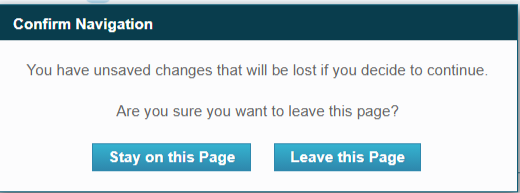
Save changes for Order Manager
Users who have applied changes to their order status, had the risk of losing the changes when using the back button. This is protected now by a popup asking the user to stay on the page or continue.
New Product Introduction: SLA Dashboard available
December, 2020, the Service Level Agreement Dashboard will be available for all connected buyers.The dashboard shows the service levels of the last 30 days and is available for Product Exchange, Order Exchange, services and applications.
As a buyer you can access the dashboard via the reporting tab in My Onetrail.
There is one user story left in the product backlog, it covers the possibility to show the SLA for the previous calendar months.
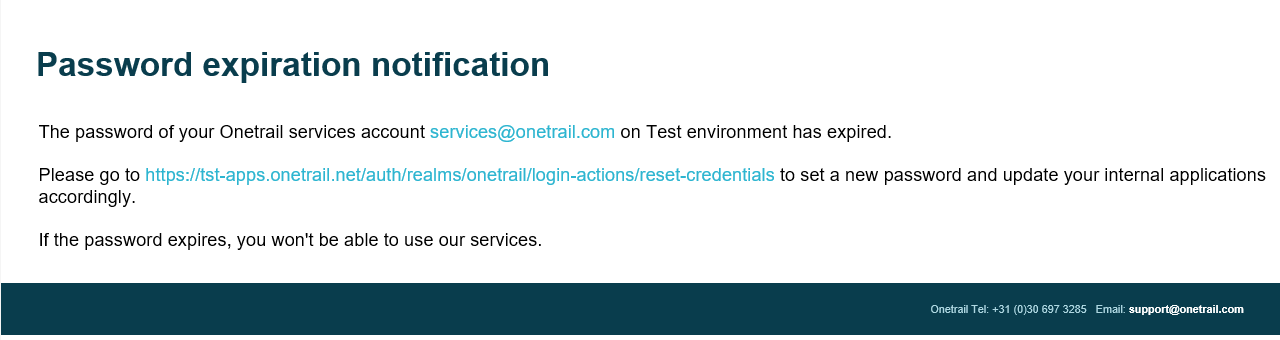
Product Update: My Onetrail password expiration
In the coming month we will enable the password expiration for user accounts for My Onetrail (TPN-Portal).
This could not done before, because the service user accounts will also expire, and that might cause you're services not to work after the password expires.
Therefor, we've developed a notification schema for the service accounts, which is currently been tested.
Service accounts are used by applications to execute services, like submitting orders and inquire real time price and availability.
So, no real users are involved that can change a password.
The functionality warns the service user AND the company administrator if the password is about to expire by email.
This starts 1 month in advance, and is repeated on weekly bases and daily during the last week.